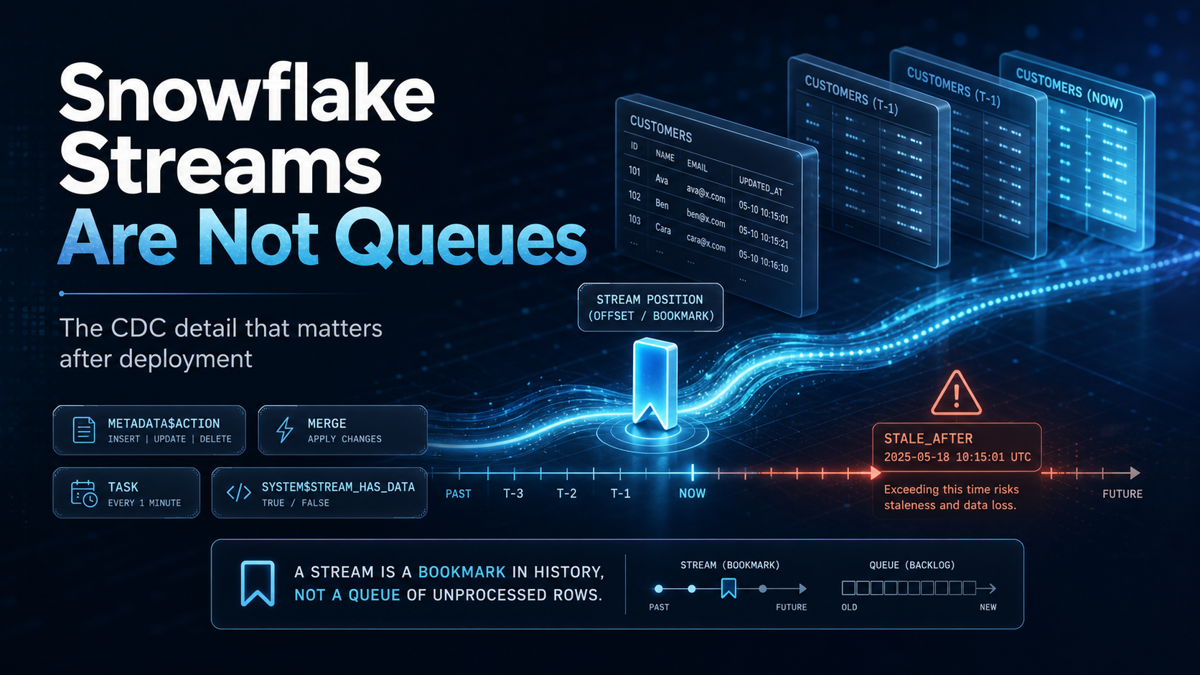
 Snowflake Streams Are Not Queues
The CDC detail that matters after deployment
Snowflake Streams make change data capture look straightforward. Create a stream on a table. Capture inserts, updates, and deletes. Use a task to process the changes. Merge them into a downstream table. For many pipelines, that pattern works well. But there is one detail that is easy to miss: a Snowflake stream is not a durable queue.
It does not permanently store every change that happened in the source table. A stream is closer to a bookmark in the source object history. It remembers a point in time, and when you query the stream, Snowflake returns the changes that happened after that point. That distinction changes how streams should be designed, monitored, and recovered.
The reason is that a bookmark can expire. And when it does, your CDC pipeline may no longer have access to the changes it was supposed to process.
The mental model: streams track offsets
A stream records changes made to a source object, such as a table or a supported view. Those changes include inserts, updates, and deletes, depending on the stream type. When you query a stream, Snowflake returns changed rows along with metadata columns. The most useful columns are:
METADATA$ACTION, METADATA$ISUPDATE, and METADATA$ROW_ID.
Those fields tell you what kind of change occurred and help your downstream logic decide whether to insert, update, or delete a record. But the stream itself is not a standalone storage layer for historical changes. It tracks an offset that points into the source object change history. If the source object history is still available, the stream can return the changes. If that history has expired, the stream becomes stale.

Figure 1: A standard stream returns the source columns plus metadata that describes each change.
How do you find stale streams in Snowflake?
The basic commands are simple:
SHOW STREAMS;
Or for a specific stream:
DESCRIBE STREAM my_database.my_schema.my_stream;
The fields to pay attention to are STALE, STALE_AFTER, TABLE_NAME, stream type, owner, and created timestamp. STALE tells you whether the stream is already stale. STALE_AFTER tells you when Snowflake expects the stream to become stale if it is not consumed. The second field is the one that matters operationally. A stream that is already stale is a recovery problem. A stream that is close to STALE_AFTER is still a prevention problem, and that is the difference between fixing the pipeline and rebuilding part of it.

Figure 2: STALE_AFTER is the field that turns stream health into an operational deadline.
How does a stream become stale?
A stream becomes stale when its offset falls outside the source object data retention period. In plain terms, the stream points to old table history; Snowflake no longer has that history available, and the stream can no longer return the unconsumed changes. At that point, the stream has to be recreated to continue tracking new changes.
The uncomfortable part is that the missing historical changes are not recovered by recreating the stream. Depending on the pipeline, recovery may require a backfill, reconciliation load, or full rebuild of the downstream table. This is why stream staleness is not just a metadata issue. It is a data reliability issue.
Reading a stream does not consume it
This is one of the easiest details to misunderstand.
   SELECT *
FROM my_stream;
That query reads the stream, but it does not advance the stream offset. You can run the same SELECT multiple times and see the same change records. That is useful for debugging, but it does not mean the stream has been processed. A stream offset advances only when the stream is used in a DML transaction.
Simple consumption example:
   INSERT INTO target_table
SELECT *
FROM my_stream;

Figure 3: A SELECT can inspect a stream, but it does not advance the stream offset.
MERGE consumption example
   MERGE INTO target_table t
USING my_stream s
ON t.id = s.id
WHEN MATCHED THEN UPDATE SET t.value = s.value
WHEN NOT MATCHED THEN INSERT (id, value) VALUES (s.id, s.value);
This matters because many teams inspect streams during troubleshooting and assume the act of reading them somehow resets the clock. It does not. Reading is inspection. DML is consumption.

Figure 4: Once the stream is consumed by DML, the offset moves forward.
The empty-stream problem
A stream can also become a risk when nothing appears to be happening.
Imagine a source table that only receives data occasionally. Maybe a vendor sends files once a week. Maybe an operational system only updates records during a month-end process. Maybe the pipeline is valid, but the business event has not happened yet. The stream may stay empty for days. That does not automatically make it safe.
Snowflake provides SYSTEM$STREAM_HAS_DATA to check whether a stream currently has change records. This function is commonly used in task conditions, so the task only runs when there is data to process.
SELECT SYSTEM$STREAM_HAS_DATA('my_database.my_schema.my_stream');
When SYSTEM$STREAM_HAS_DATA returns FALSE for an empty stream, it can help prevent the stream from becoming stale.But if it returns TRUE, Snowflake expects the stream to be consumed. In some cases, the function can return a false positive. If that happens and the stream is not consumed, a task using this function may continue running even though there are no useful records to process.
For that situation, Snowflake documents a practical no-op pattern:
CREATE TEMPORARY TABLE _unused_table AS
SELECT *
FROM my_stream
WHERE 1 = 0;
No rows are written because of WHERE 1 = 0. But the CREATE TABLE AS SELECT operation still consumes the stream in a DML transaction and advances the offset.That is a small detail, but it is the kind of detail that keeps a CDC pipeline from becoming noisy, expensive, or stale.
Final takeaway
Snowflake Streams are a strong CDC feature, but they are not something to treat as fire-and-forget.
The important shift is understanding what a stream really is. It is not a queue that permanently stores every change until a consumer is ready. It is an offset into the source object’s change history. That means stream design has to account for more than the initial CREATE STREAM statement.
You need to know how the stream is consumed, how often the consuming task runs, what happens when no data arrives, which role is checking STALE_AFTER, and whether multiple consumers are competing for the same offset.
The risky part is not usually creating the stream.The risky part is assuming it will still be valid when the pipeline finally needs it.For production use, the safest approach is simple:
• Use the right stream type.
• Consume it through DML.
• Monitor STALE_AFTER.
• Use one stream per consumer.
• Test the empty-stream path.
• Document the recovery process before the stream becomes stale.
Snowflake Streams can make CDC much cleaner.But only if they are treated as operational objects, not just SQL objects.


Carlos Alves
I’m Carlos, a Data Engineer and founder of 2BInformed. I focus on data engineering, system integrations, workflow automation, and the practical use of AI. Using SQL Server, Python, Dell Boomi, Fivetran, Snowflake, dbt, and n8n, I build reliable data pipelines, connect applications, improve data quality, and automate manual business processes. I’m also available for freelance projects involving integrations, automation, data solutions, workflow design, and technical consulting.
Comments (0)
Leave a Comment
No Comments Yet
Be the first to share your thoughts on this article!